Integration Tests: My Latest Obsession
Shipping fast is great until you break something you didn’t know you touched. As agents write more of my code, I’m moving faster than ever — but that speed comes with a new concerns: how do I stay confident that core functionality still works after every deploy?
Unit tests help, but they don’t catch failures that only surface when multiple components interact. What’s actually given me peace of mind is investing in robust integration tests that cover full user journeys using real dependencies. This post covers how I think about that layer of testing and how I’ve put it into practice building CheckIn More.
Quick Overview of Testing Layers
If you’re unfamiliar with the testing landscape, here’s a quick orientation:
- Unit tests cover individual functions or components in isolation. They should generally avoid external dependencies and instead rely on mocks or in-memory substitutes — though some teams use lightweight test databases here (more on that below).
- Integration tests cover the interaction between multiple components and may use real dependencies to validate end-to-end behavior.
- End-to-end tests simulate real user interactions through the UI and validate the entire stack front to back.
Most systems follow a testing pyramid: many unit tests, fewer integration tests, and even fewer end-to-end tests. I haven’t ventured into pure end-to-end testing yet, as it tends to be more intensive and my UI is still evolving.
Aside: I’ve seen unit tests that make real API requests and then fail when the API is down. Please don’t do this.
A Note on Test Databases
Some of my “unit” tests spin up a real test database — seeding it before the suite and tearing it down after. Purists would call these integration tests since they touch a real dependency, but they’re scoped tightly enough to feel unit-like.
The label matters less than the intent: fast, isolated, and deterministic. If your test can run in milliseconds, cleans up after itself, and doesn’t depend on external state, it’s doing its job regardless of what you call it.
Staging Environment Setup
The core principle: test against real dependencies wherever possible. Mocks give you false confidence — they test that your code calls the right method, not that the integration actually works.
I run my integration tests against a staging environment after deploying to it, making them closer to post-deployment smoke tests than traditional pre-deploy integration tests. Staging is nearly identical to prod, with one key difference: all the secrets in its key vault point to test resources. This integrates naturally with Clerk’s dev environment, Twilio’s test endpoint, and similar test modes that most services offer.
For paths where no good test environment exists — like ElevenLabs — I have a last-minute bail to abort before the call goes out. The goal is to avoid triggering real external side effects like charges or irreversible actions during a test run. Mocks aren’t an option here because the code is already deployed and running remotely in staging; there’s nothing to intercept at the process level.
The other non-negotiable: tests must be fully self-contained. Every test run should set up its own data and tear down completely when it’s done. Shared state between tests is a recipe for flakiness and false positives.
Solo vs. team note: A single shared staging environment works fine for a solo developer. For teams, concurrent test runs can stomp on each other’s data — the solution is ephemeral environments, spinning up an isolated container per test run. Even solo, rigorous setup and teardown keeps things clean.
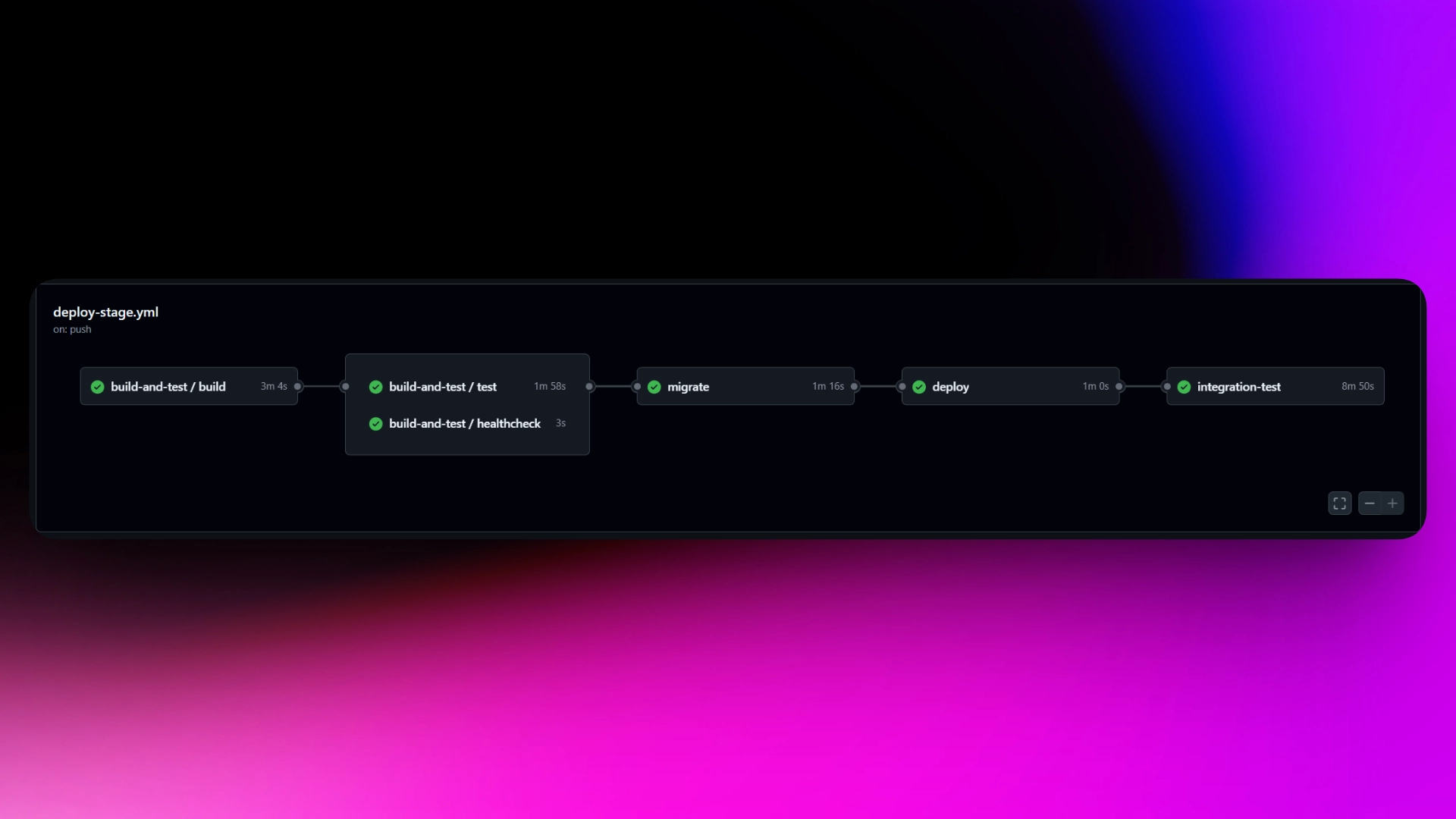
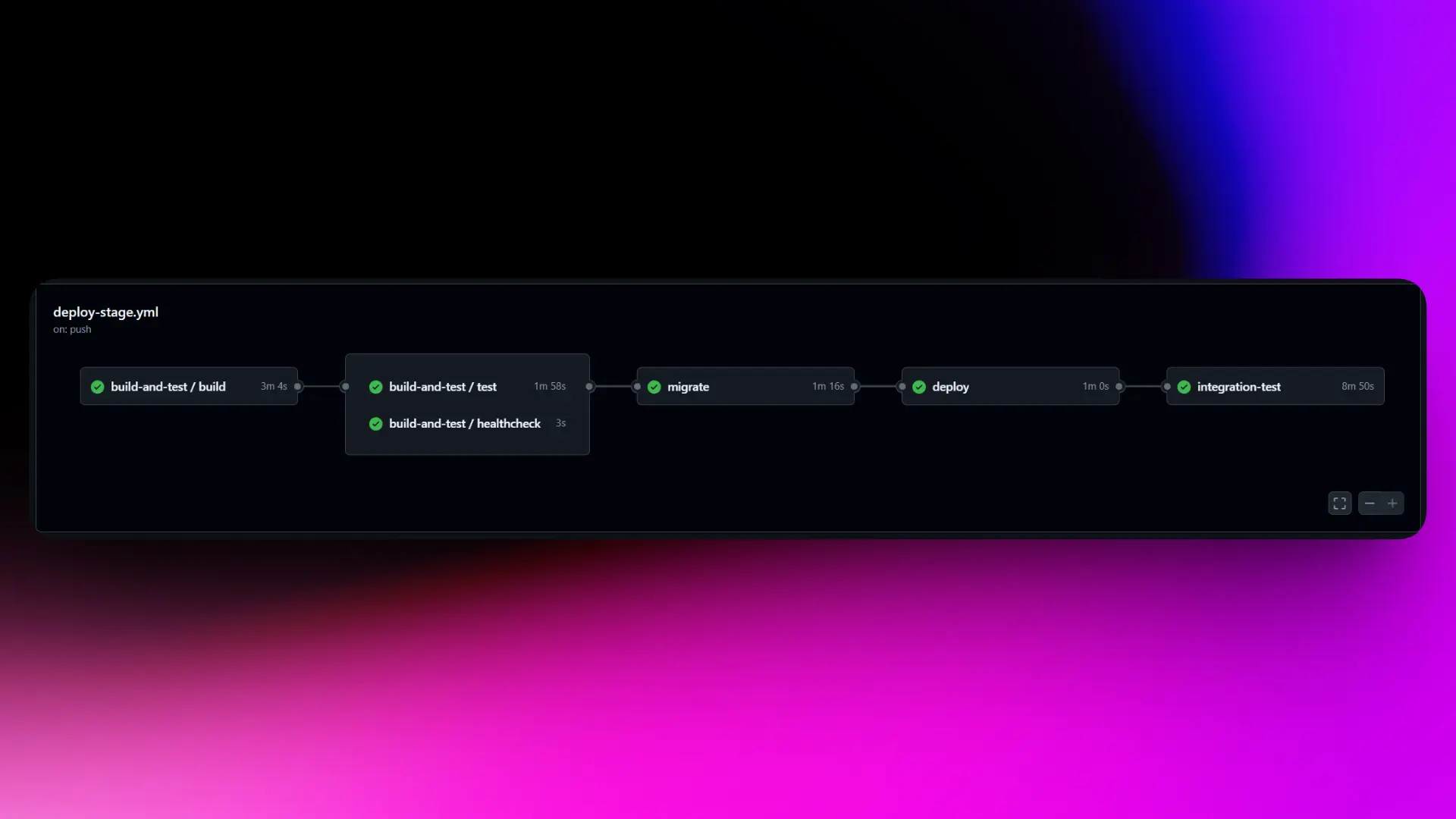
My pipeline on merge to main: build → unit tests → DB migrations → deploy to stage → integration tests.
Integration Test Steps
Here’s what a full test run looks like in practice. Notice how each step maps back to the principles above — real dependencies, self-contained, full teardown.
- Poll for readiness. Wait until stage is healthy and the service version matches the git SHA of the commit being tested. Deploys can fail or lag; you don’t want to run tests against a stale version.
- Create a test user in Clerk.
- Let webhooks do the work. Clerk fires a webhook to stage, creating the user in the DB — the same flow a real user would trigger.
- Fetch a user token from Clerk.
- Create an authenticated API client for making requests to the staging environment.
- Simulate real user interactions through the client.
- Assert on responses and side effect state.
- Tear down completely. Delete the user from Clerk, which fires a webhook → cascade deletes everything from the DB. Clean slate for the next run.
Conclusion
The goal of all this isn’t to have tests — it’s to have confidence. A green pipeline should mean you can deploy and go to sleep without your phone lighting up.
The principles that got me there: test against real dependencies wherever you can, keep every test self-contained with full teardown, and run your integration tests against an environment that mirrors prod as closely as possible. Your specific stack will look different from mine, but those fundamentals apply regardless.
I now have a step in my prod deployment pipeline that verifies the latest commit is green on stage before anything ships. That’s the finish line.
← Back to blog